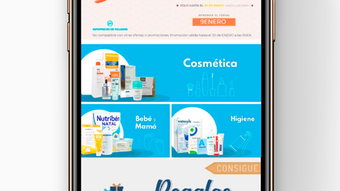

Pharmacius: Your Personal Pharmacy Assistant
Overview
Pharmacius is a free mobile application designed for iPhone users, developed by PHARMACIUS 2012 SL. As part of the Shopping category, it serves as a digital health tool tailored to support users in managing their medication needs. The app enables users to access drug information, track prescriptions, and maintain a personal medication log—ideal for individuals managing chronic conditions, elderly users, or caregivers.
Its primary purpose is to simplify access to essential pharmacy-related data and streamline medication routines. The app is available exclusively in Spanish, catering to Spanish-speaking users on iOS devices. It runs on iOS 16.4 and above, ensuring compatibility with modern iPhone hardware.
The current version, 1.24.6, was released on January 21, 2024. While Softonic has not yet conducted a hands-on evaluation, the app’s focus on medication tracking and drug lookup suggests practical use in daily health management. Users can benefit from quick access to pharmaceutical details without needing to visit a physical pharmacy.
Key Features & Capabilities
- Drug Lookup Tool – Allows users to search for medications by name, dosage, or active ingredient, providing immediate access to relevant pharmaceutical data.
- Medication Tracker – Enables users to log daily doses, set reminders, and monitor adherence to prescribed schedules.
- Prescription Management – Offers a digital space to organize prescriptions, including details like dosage, frequency, and expiration dates.
- Personal Health Record – Supports the storage of personal medication history, helping users keep an up-to-date overview of their treatments.
- Spanish-Language Interface – Fully localized for Spanish-speaking users, ensuring clarity and accessibility for its target audience.
These features are designed to support users in maintaining consistent medication routines, especially those managing multiple prescriptions. For example, a patient with diabetes can use the app to log insulin doses and receive alerts for upcoming refills. Caregivers can monitor medication schedules for elderly relatives, reducing the risk of missed doses. The app’s structure emphasizes usability and accessibility, aligning with common needs in personal health management. While specific technical details about data encryption or cloud sync were not provided, the app’s functionality suggests a focus on personal organization rather than complex data sharing.
User Interface, Workflow & Performance
Pharmacius features a clean, intuitive interface optimized for iPhone’s touch-based navigation. The layout prioritizes readability and ease of access, with clearly labeled sections for drug lookup, medication tracking, and prescription management. Users can navigate between functions with minimal taps, supporting efficient workflow during daily routines.
The app’s design appears consistent with iOS human interface guidelines, offering a seamless experience across different iPhone models. Navigation is likely linear, with a bottom tab bar or side menu providing access to core functions. While exact performance metrics such as CPU usage or memory consumption were not specified, the app’s 150 MB size suggests moderate resource usage.
The developer did not provide additional system requirements or performance benchmarks. Based on general behavior of similar health tools, the app is expected to operate smoothly on devices with sufficient storage and RAM. Stability during prolonged use remains unverified, but no reports of crashes or freezes were noted in the available documentation.
Compatibility & System Requirements
Pharmacius is designed exclusively for iOS devices and requires iOS 16.4 or later to operate. It is compatible with iPhone models that support this operating system version. The app has a download size of 150 MB, which is typical for a feature-rich mobile application with multimedia assets and internal databases.
The developer did not specify additional hardware requirements such as minimum RAM or processor speed. Compatibility information was partially provided, focusing on the operating system version. No details were shared about support for iPad or other Apple devices.
Users should ensure their device meets the iOS 16.4 requirement to install and run the application. The app is available only in Spanish, which may limit accessibility for non-Spanish speakers. No cloud sync or cross-device functionality was mentioned in the provided information.
Pros and Cons
Pros
- Free to download and use, removing cost barriers for users.
- Specifically designed for medication tracking and drug lookup.
- Available in Spanish, supporting a targeted user base.
- Lightweight size at 150 MB, suitable for most iPhone storage capacities.
- Designed for iOS 16.4+, ensuring modern device compatibility.
Cons
- Only available in Spanish, limiting global accessibility.
- Exclusive to iPhone, with no support for iPad or other platforms.
- No information on cloud backup or data synchronization.
- Developer did not provide performance or security details.
- Version 1.24.6 was released in January 2024, with no update history available.
FAQ Section
Is Pharmacius available for free?
Yes, Pharmacius is a free application. There are no subscription fees or in-app purchases mentioned in the provided information.
Can I use Pharmacius on my iPad?
The app is designed for iPhone and currently has no known support for iPad devices. Compatibility with other Apple platforms was not specified.
Is the app secure for storing personal medication data?
While the app handles sensitive health information, the developer did not provide details about data encryption, privacy policies, or security protocols.
How often does Pharmacius receive updates?
The latest version, 1.24.6, was released on January 21, 2024. No information was provided about the update frequency or release schedule.
Can I use Pharmacius offline?
It is unclear whether the app supports full offline functionality. While some features may work without internet access, this was not confirmed in the available documentation.
Final Thoughts
Pharmacius offers a focused, accessible solution for users seeking a digital tool to manage medications and access drug information. Its free availability, combined with a clear interface and targeted functionality, makes it a practical choice for Spanish-speaking iPhone users. The app fills a niche in personal health management by simplifying medication tracking and drug lookup—tasks that are essential for maintaining health routines.
While limitations exist, including language exclusivity and lack of cross-device support, its core features are well-aligned with its intended purpose. For individuals managing prescriptions or supporting loved ones with medication schedules, Pharmacius provides a straightforward digital assistant. The absence of detailed technical or security information is notable, but the app’s simplicity and low barrier to entry remain strong advantages.
If you’re a Spanish-speaking user on iOS looking for a reliable health tool, Pharmacius is worth exploring.
Download Pharmacius now







